Bulk Prompt Line Break Generator Updated 2026– Free Online Tool
Bulk Prompt Line Break Generator is a free online tool that adds blank lines between multiple AI image prompts. Format and copy bulk prompts instantly.
Add Line Breaks
Bulk Prompt Line Break Generator
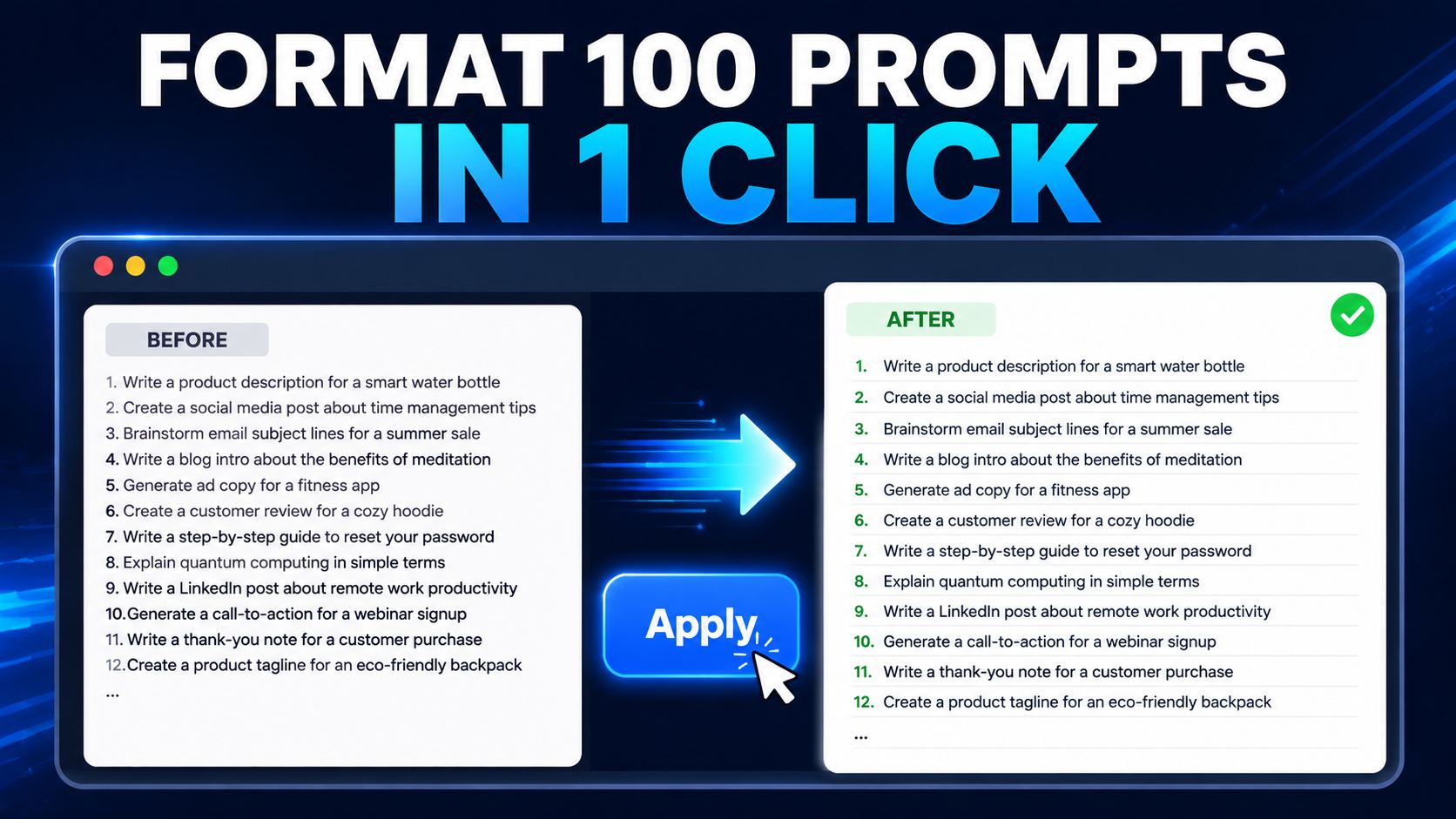
The Bulk Prompt Line Break Generator is a free online tool that adds blank lines between multiple AI image prompts. If you have dozens or hundreds of prompts written on separate lines, this tool can format them instantly and make them easier to copy, organize, and process.
There is no software to download and no account registration is required. Everything works directly inside your browser. Paste your prompts, choose the number of blank lines you want to insert, and click the Apply button.
What Is a Bulk Prompt Line Break Generator?
A Bulk Prompt Line Break Generator is a simple text-formatting tool designed to insert consistent blank lines between multiple prompts.
For example, your original text may look like this:
Prompt 1
Prompt 2
Prompt 3
Prompt 4
After selecting one blank line, the formatted text becomes:
Prompt 1
Prompt 2
Prompt 3
Prompt 4
This makes long prompt lists cleaner, more readable, and easier to use with AI image generators, bulk-processing tools, browser extensions, and automated creative workflows.
How to Use the Tool
Follow these simple steps:
- Copy your complete list of image prompts.
- Paste the prompts into the Input/Output box.
- Select the number of blank lines you want to add.
- Click the Apply button.
- Review the formatted prompts.
- Click Copy to copy the complete result.
- Paste the formatted prompts into your preferred AI tool or document.
To remove the existing text and start again, click the Clear button.
Important Formatting Requirement
This tool considers every non-empty line a separate prompt. For the best results, place one complete prompt on each line before clicking Apply.
Correct input format:
Cinematic view of an ancient Roman city at sunrise
Close-up portrait of a Roman soldier wearing detailed armor
Busy marketplace filled with merchants and local citizens
If a single prompt is divided across several lines, the tool may treat each line as a separate prompt. Convert every prompt into one continuous line before formatting your list.
Key Features
Add One or More Blank Lines
Select one, two, or three blank lines depending on the formatting requirements of your workflow.
Bulk Prompt Processing
The tool can format a large list of prompts at once, saving time when working with dozens or hundreds of AI-generated scenes.
Automatic Spacing Normalization
Existing empty lines are removed before the selected spacing is applied. This prevents additional gaps from accumulating if you click Apply more than once.
One-Click Copy
After formatting your prompts, use the Copy button to copy the complete result to your clipboard.
Quick Clear Option
The Clear button removes all text from the input box, allowing you to start a new formatting task immediately.
Browser-Based Processing
The tool runs directly in your browser. You do not need to install desktop software or create an online account.
Desktop and Mobile Support
The responsive interface works on desktop computers, laptops, tablets, and mobile browsers.
Who Can Use This Tool?
The Bulk Prompt Line Break Generator is useful for:
- AI image creators
- YouTube content creators
- Documentary video editors
- Social media managers
- Digital marketers
- Graphic designers
- Prompt engineers
- Bloggers and website owners
- Students and researchers
- People using bulk automation workflows
It is especially helpful when a project contains many image prompts that need consistent separation before being added to another tool.
Which AI Tools Can Use the Formatted Prompts?
The formatted text can be copied and used with many AI and creative platforms, depending on their current input requirements. These may include:
- Google Flow
- ChatGPT
- Midjourney
- Adobe Firefly
- Leonardo AI
- Ideogram
- Stable Diffusion interfaces
- Text-to-image browser tools
- Prompt queue extensions
- Custom automation systems
This website is an independent utility and is not affiliated with, endorsed by, or sponsored by any of these platforms.
Why Add Blank Lines Between Prompts?
Blank lines create a clear visual boundary between individual prompts. This becomes increasingly important when a document contains many similar scene descriptions.
Proper spacing can help you:
- Read prompt lists more easily
- Identify individual prompts quickly
- Reduce accidental prompt merging
- Prepare text for bulk-processing workflows
- Keep scene descriptions organized
- Review and edit large projects efficiently
- Share clean prompt lists with team members
Consistent formatting is particularly useful for documentary videos, storyboards, social media campaigns, product-image projects, and other content that requires a large number of visuals.
Does This Tool Generate AI Images?
No. This tool does not create, edit, or download images. It only formats text by adding blank lines between individual prompts.
After formatting, you must copy your prompts and submit them to an AI image generator or another compatible platform.
Is the Bulk Prompt Line Break Generator Free?
Yes. The Bulk Prompt Line Break Generator is free to use. You can format your text without purchasing software or creating an account.
Does the Tool Upload My Prompts?
The formatting process is performed in your browser. However, you should avoid entering passwords, private credentials, financial details, confidential business information, or other sensitive data into any online text-processing tool.
Can I Format Hundreds of Prompts?
Yes. You can paste a large prompt list into the text box. The practical limit may depend on your browser, device memory, and the total length of the text.
For smoother performance on older mobile devices, consider formatting extremely large prompt collections in smaller batches.
Related AI and Productivity Tools
Explore more free browser-based tools designed to simplify your content creation and editing workflow.
Free Auto Video Editor
Create videos from images and voiceovers directly in your browser. Choose an aspect ratio, add transitions, background music, captions, and export your project as an MP4 video.
MP3 to Text Converter
Convert MP3 audio into editable text online. This tool is useful for creating transcripts, captions, notes, articles, and video scripts from recorded audio.
Text to Speech Tool
Convert written text into spoken audio for videos, presentations, accessibility, educational content, and other creative projects.
Free Online Audio Silence Remover
Automatically detect and remove silent sections from audio recordings. Create cleaner voiceovers, podcasts, narrations, and video soundtracks without manual editing.
Free Keyword Idea Finder
Discover useful keyword ideas for articles, videos, online tools, social media posts, and search-engine optimization campaigns.
Frequently Asked Questions
How do I add one blank line between every prompt?
Paste one prompt per line, select “Add 1 blank line,” and click Apply. The tool will place one empty line between each prompt.
Can I add two or three blank lines?
Yes. Use the spacing menu to select two or three blank lines before clicking Apply.
Will clicking Apply twice create extra spaces?
No. The tool removes existing empty lines before applying your selected spacing. This helps maintain consistent formatting.
Can I use the tool on a mobile phone?
Yes. The page is designed to work on modern mobile browsers, tablets, laptops, and desktop computers.
Can the tool identify multi-line prompts automatically?
The current version treats every non-empty line as a separate prompt. Each complete prompt should therefore be placed on one line.
Can I copy all formatted prompts at once?
Yes. Click the Copy button after applying the required spacing.
Do I need to install an extension?
No. The Bulk Prompt Line Break Generator works directly on this webpage and does not require a browser extension.
Does this tool remove my prompt text?
It only removes existing empty lines and reapplies your selected spacing. It does not intentionally rewrite the wording of your prompts. Always review the final text before using it in another application.
Final Note
The Bulk Prompt Line Break Generator offers a fast and convenient way to organize large collections of AI image prompts. Whether you are preparing scenes for a YouTube documentary, creating social media visuals, or managing an automated image workflow, consistent prompt spacing can make your work easier to review and process.
Paste your prompts into the tool above, choose the required spacing, click Apply, and copy the formatted result.
Disclaimer
The Bulk Prompt Line Break Generator is provided as a free text-formatting utility for general informational and productivity purposes. It is designed to add blank lines between user-supplied text prompts. The tool does not generate images, submit prompts to third-party platforms, guarantee compatibility with any external service, or promise particular creative, commercial, or technical results.
Users are responsible for reviewing their formatted prompts before using them. You should not enter passwords, payment information, authentication tokens, confidential documents, personally identifiable information, or other sensitive data into this tool.
We make reasonable efforts to keep the tool available and functional, but we do not guarantee that it will always operate without interruptions, errors, data loss, or compatibility issues. Use of this tool is entirely at your own discretion and risk. ReviewAndDecide.com will not be responsible for losses or damages resulting from reliance on the tool, formatted output, website availability, or use of third-party services.
Third-Party Services Disclaimer
This website may mention third-party products and platforms such as Google Flow, ChatGPT, Midjourney, Adobe Firefly, Leonardo AI, Ideogram, Stable Diffusion, or other artificial-intelligence services for descriptive and informational purposes.
ReviewAndDecide.com is an independent website. It is not affiliated with, endorsed by, sponsored by, or officially connected with Google, OpenAI, Adobe, Midjourney, Leonardo AI, Ideogram, Stability AI, or any other third-party platform mentioned on this page.
All company names, product names, logos, trademarks, and registered trademarks belong to their respective owners. Users must follow the terms, usage limitations, content rules, copyright requirements, and privacy policies of any third-party service they choose to use.
User Responsibility and Acceptable Use
You agree not to use this tool for unlawful, fraudulent, abusive, deceptive, harmful, or rights-infringing activities. You are responsible for ensuring that your prompts and resulting content comply with applicable laws and the policies of the AI platform or service where they are submitted.
Do not use this tool to prepare content that:
- Violates copyright, trademark, privacy, or publicity rights.
- Promotes illegal, deceptive, or fraudulent activities.
- Contains malware, malicious code, phishing material, or harmful instructions.
- Exploits, threatens, harasses, or unlawfully targets another person.
- Violates the rules of Google, an AI platform, or another third-party service.
- Contains private credentials or confidential personal information.
ReviewAndDecide.com does not monitor, approve, endorse, or claim ownership of text entered by users.
Advertising and Google AdSense Disclosure
ReviewAndDecide.com may display advertisements provided by Google AdSense or other advertising partners. Advertising providers may use cookies, web beacons, device identifiers, IP addresses, or similar technologies to deliver, personalize, limit, and measure advertisements, subject to user consent and applicable law.
Google and its advertising partners may use information collected from visits to this and other websites to provide advertising based on user interests or previous interactions. Where required, visitors may be presented with privacy or consent controls before cookies or personalized advertising technologies are used.
The appearance of an advertisement does not constitute an endorsement or recommendation by ReviewAndDecide.com. Advertisers are responsible for their advertisements, products, services, offers, claims, privacy practices, and destination websites.
Users should never click advertisements merely to support this website. Publishers, website administrators, team members, friends, and visitors should not repeatedly click ads, encourage ad clicks, artificially generate impressions, or use automated methods to interact with advertisements.
Cookies and Consent
This website may use essential cookies to support basic functionality. Subject to your region and choices, it may also use analytics, advertising, preference, security, and measurement cookies.
Where required by law or Google policy, ReviewAndDecide.com will request consent before using cookies or local storage for personalized advertising and before collecting, sharing, or using personal data for advertising purposes.
Visitors may manage their available consent choices through the website’s cookie banner or consent-management controls. Browser settings may also allow users to block or delete cookies, although doing so may affect certain website features.
For complete information about the data collected by this website, advertising services, cookies, retention, user choices, and contact details, please read our Privacy Policy and Cookie Policy.
Content and Ad-Placement Statement
This page is created to provide a useful browser-based text-formatting tool together with original instructions, examples, frequently asked questions, and supporting information.
Advertisements, when displayed, are intended to remain distinguishable from the tool’s buttons and website navigation. Ads should not be presented as download buttons, Apply buttons, Copy buttons, navigation controls, warnings, or required steps for using this tool.
The presence, number, location, and format of advertisements may change over time. We aim to follow the applicable Google Publisher Policies and AdSense Program Policies, but Google retains sole authority to interpret and enforce its policies and to determine advertising eligibility.
No Guarantee of AdSense Approval
The presence of this disclaimer does not guarantee acceptance into Google AdSense, uninterrupted ad serving, search-engine ranking, traffic, revenue, or compliance with every law or advertising requirement.
Google may evaluate factors including website quality, original content, navigation, user experience, traffic quality, privacy disclosures, prohibited content, ad placement, and overall policy compliance. ReviewAndDecide.com remains responsible for maintaining its website and responding to applicable policy updates.
Policy Reference Links
For additional information, consult these official Google resources:
- Google AdSense Program Policies
- Google Publisher Policies
- How AdSense Uses Cookies
- Google Consent Management Requirements
- Google EU Consent and CMP Setup
- How Google Uses Information from Partner Sites
- Google Privacy Policy
- Google Terms of Service
These links are provided for convenience. Google may update its policies, technical requirements, or documentation at any time. Website owners should review the official policies regularly.
Contact
If you have questions about this tool, advertising disclosure, privacy practices, or website content, please contact us through the Contact Us page on ReviewAndDecide.com.
Last updated: September 2026