
IP Blacklist Check PRO – Check If Your IP Is Blacklisted Online Free
Check if your IP address is blacklisted instantly with our free IP Blacklist Check PRO tool. Scan spam, DNSBL, firewall, and blacklist databases online.
IP Blacklist Check PRO
Scan your public IPv4 address against blacklist and DNSBL databases to spot spam reputation issues, server reputation problems, and potential email delivery risks.
| Blacklist Provider | Zone | Status | Response | Details |
|---|---|---|---|---|
| Run a scan to load blacklist history results. | ||||
Check If Your IP Is Blacklisted Free Online 2026 Complete Guide
Use our free IP Blacklist Check PRO tool to instantly scan your public IP against popular spam and blacklist databases. Detect email blacklist issues, reputation problems, VPN server flags, hosting IP bans, and network security warnings in seconds.
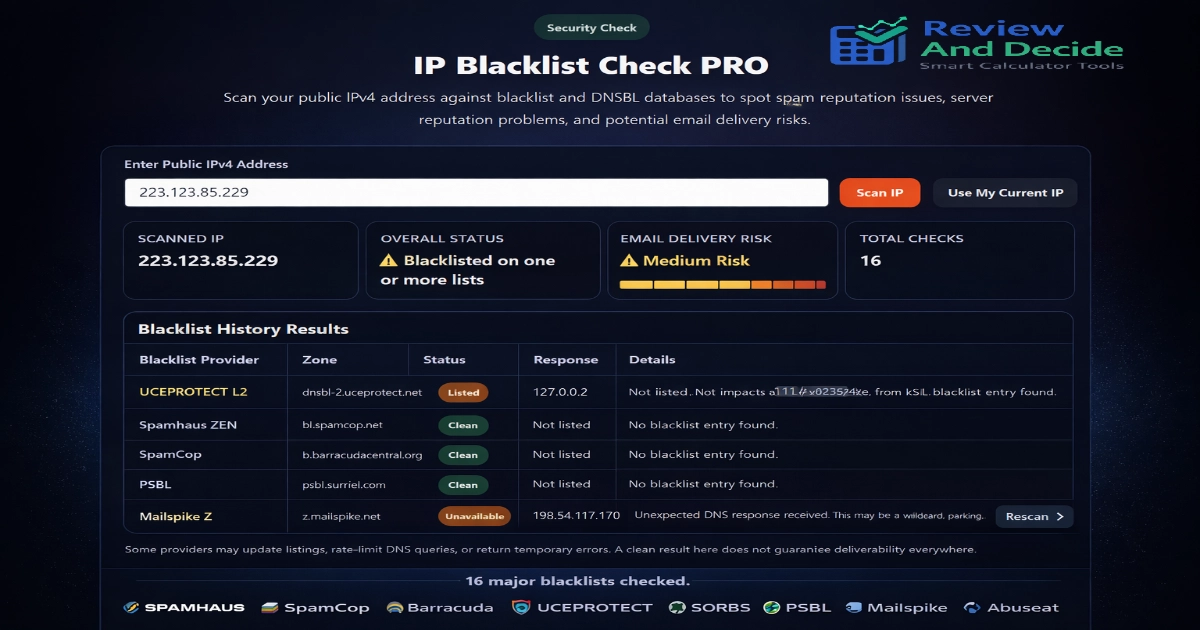
IP Blacklist Check PRO – Check If Your IP Is Blacklisted Online Free
If emails are landing in spam, websites are blocking your server, or you suspect your public IP has a bad reputation, use our IP Blacklist Check PRO tool to scan blacklist databases instantly.
This free online checker helps identify whether your IP appears on common DNSBL, spam reputation, firewall, or abuse monitoring lists used by mail servers, security providers, and hosting networks.
Our tool is designed for:
- Website owners
- Bloggers
- Email marketers
- VPS / Dedicated server users
- Small businesses
- IT administrators
- VPN users
- Home broadband users
You can check your public IPv4 address in seconds without signup.
What Is an IP Blacklist?
An IP blacklist is a database of internet addresses reported for suspicious behavior such as:
- Spam email sending
- Malware traffic
- Open proxies
- Botnet activity
- Abuse reports
- Mass unsolicited mail
- Compromised servers
- Poor sender reputation
Mail servers, hosting companies, and security systems often use blacklist data to reduce abuse and unwanted traffic.
Why Your IP May Be Blacklisted
Common reasons include:
1. Spam Activity
If spam originated from your IP or server.
2. Infected Device
Malware on a PC, VPS, or router generating bad traffic.
3. Shared Hosting Reputation
Another user on shared hosting caused damage.
4. VPN or Proxy Usage
Some networks flag public VPN ranges.
5. Dynamic ISP IP Ranges
Some residential IP pools may appear on policy lists.
6. Misconfigured Email Server
Missing SPF, DKIM, PTR, or open relay problems.
Signs Your IP Has Reputation Problems
You may notice:
- Emails going to spam
- SMTP blocks
- Contact forms failing
- Slow account approvals
- Login security challenges
- CAPTCHA everywhere
- Server warnings
- Website firewall restrictions
How To Use IP Blacklist Check PRO
Step 1
Open the tool above.
Step 2
Enter any public IPv4 address or click Use My Current IP.
Step 3
Click Scan IP.
Step 4
Review:
- Overall status
- Risk level
- Listed count
- Clean count
- Provider history results
What The Results Mean
Clean
No blacklist entry found.
Listed
Your IP matched one or more databases.
Unavailable
Provider did not return a usable DNS response at that moment.
Medium Risk / High Risk
Multiple listings or reputation concerns detected.
Blacklists Often Checked
Depending on availability, tools may scan databases such as:
- Spamhaus
- SpamCop
- Barracuda
- UCEPROTECT
- SORBS
- PSBL
- Mailspike
- Abuseat
- Backscatterer
- DroneBL
- WPBL
- Spamrats
If Your IP Is Listed – What To Do
1. Check Devices for Malware
Run antivirus and router security checks.
2. Review Email Practices
Stop bulk unsolicited sending.
3. Secure Your Server
Update CMS, plugins, passwords, SSH, firewall.
4. Fix DNS Records
Ensure:
- SPF
- DKIM
- DMARC
- PTR / Reverse DNS
5. Request Delisting
Use the blacklist provider’s official removal process.
6. Contact ISP or Hosting Provider
They may assign a clean IP.
Residential vs VPN vs Hosting IPs
Residential IP
Usually from home broadband/mobile networks.
Hosting IP
Datacenter IP used for VPS or servers.
VPN IP
Shared privacy network IP ranges sometimes challenged by websites.
Why Email Delivery Can Fail Even With a Clean Result
Blacklist checks are useful, but email systems also consider:
- Domain reputation
- SPF / DKIM / DMARC
- Bounce rate
- Complaint rate
- Sending volume
- Content quality
- Historical behavior
So a clean IP does not guarantee inbox placement.
Best Practices To Maintain Clean IP Reputation
- Use strong passwords
- Keep software updated
- Avoid spam campaigns
- Authenticate email properly
- Monitor logs
- Limit suspicious scripts
- Use reputable hosting
- Rotate compromised credentials quickly
Who Should Use This Tool
Bloggers & Website Owners
Check server reputation.
Businesses
Improve email delivery.
Freelancers
Audit client hosting setups.
IT Teams
Quick diagnostics.
Privacy Users
Check VPN IP reputation.
Why Use ReviewAndDecide IP Blacklist Check PRO
Our tool focuses on:
- Fast scans
- Clean UI
- Multiple providers
- Risk summary
- Simple interpretation
- Free access
- SEO-friendly educational guidance
ReviewAndDecide Smart Tools
Use these helpful tools next:
👉 What Is My IP Address Tool
👉 Internet Speed Test Tool
👉 Password Strength Checker
👉 QR Code Generator Tool
👉 DNS Leak Test Tool (future tool suggestion)
Important Disclaimer
Blacklist databases are maintained by third parties. Listings can change over time. A clean result does not guarantee email deliverability or unrestricted access everywhere. Always verify using official provider resources.
Educational & Transparency Notice
This content is provided for educational and diagnostic purposes only. It does not replace professional server administration, cybersecurity review, or deliverability consulting.
Frequently Asked Questions (FAQ)
Is IP Blacklist Check PRO free?
Can I check my own IP?
Does blacklist mean hacked?
Can a VPN IP be blacklisted?
How long does delisting take?
Does this work on mobile data IPs?
High Authority References
Spamhaus – IP & Domain Reputation Intelligence
SpamCop Blocking List Information
Barracuda Reputation System
Google Email Sender Guidelines
Google Search Central – Helpful Content
Google Search Central – Search Essentials
Final Thoughts
If your emails fail, your VPS gets blocked, or you simply want to know whether your IP has reputation issues, IP Blacklist Check PRO is a fast and practical solution.
Run a scan above now and check your public IP instantly.