
Check any IP address for fraud risk in seconds. Our free IP Fraud Score Checker analyses an IP for VPN, proxy and Tor usage, hosting/datacenter signals, public blacklist listings and abuse reports, then combines everything into one clear fraud score from 0 to 100 — with the full breakdown shown, so you can see exactly why an IP scored the way it did.
Score is an estimate from combined public signals — no IP check is 100% accurate.
Connection details
Signals
How this score was calculated
| Signal | Result | Points |
|---|---|---|
| Total (clamped 0–100) | – | |
Points model: Tor +40 · Proxy +35 · VPN +25 (proxy/VPN not stacked) · Datacenter +15 · each DNS blacklist listing +15 (max +30) · AbuseIPDB confidence ×0.40 · provider risk ×0.20.
What Is an IP Fraud Score?
An IP fraud score is a risk rating from 0 to 100 given to an internet connection. A score near 0 means the IP looks like an ordinary, trusted connection; a score near 100 means the IP carries several risk signals, such as proxy or VPN use, a server (datacenter) origin, or appearances on public abuse and spam blocklists. Websites, shops and ad networks use these scores as a quick first filter before trusting a visitor, a sign-up or an order.
Why Websites Check IP Fraud Scores
Fraud, bots and abusive traffic almost always hide behind risky connections. Checking the score of a visitor’s IP helps site owners spot suspicious sign-ups, fake orders, credential-stuffing attempts and bot traffic early — before they cause damage.
What a Fraud Score Can and Cannot Tell You
A score summarises signals about a connection, not about a person. Shared addresses (offices, mobile networks, universities) mean one IP can represent hundreds of innocent users, and IPs are reassigned over time. Treat every score as a reason to look closer — never as proof about an individual.
How To Check an IP Address for Fraud (Step by Step)
1. Enter any public IPv4 or IPv6 address, or press ‘Use My IP’ to check your own connection.
2. Press ‘Check IP’.
3. Review the fraud score, the connection details (country, city, ISP, ASN) and the status indicators.
4. Open the score breakdown to see which signals added risk points and which sources reported them.
How This IP Fraud Checker Works
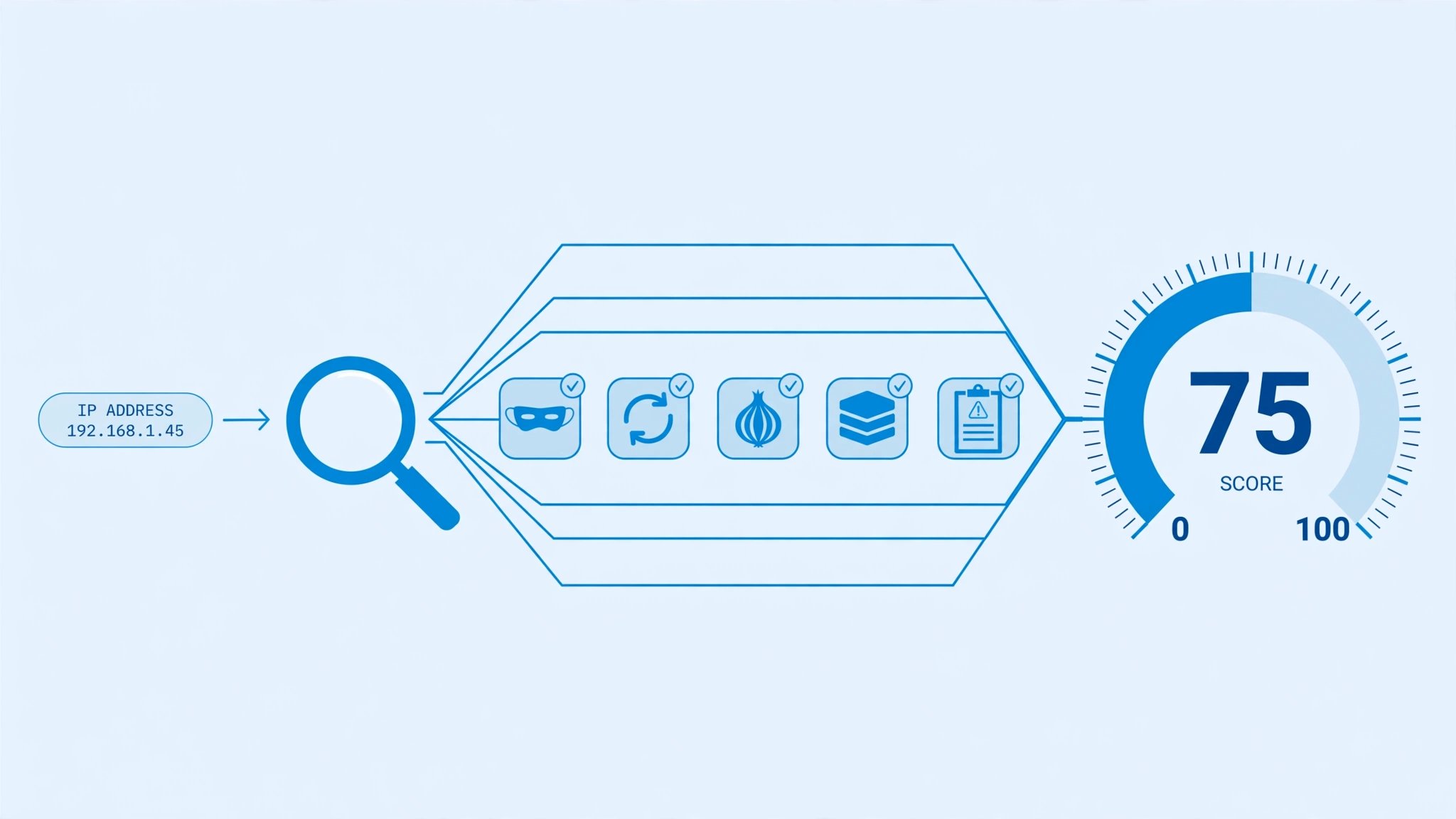
Step 1 – Network and Location Lookup
Your query first goes to network databases that identify the IP’s country, region, city, internet provider (ISP), organisation and ASN, and whether the address belongs to a home connection or a server.
Step 2 – VPN, Proxy and Tor Detection
The checker then compares the IP against proxy and VPN intelligence and the public Tor exit-node data, the three most common ways automated and abusive traffic hides its origin.
Step 3 – Blacklist and Abuse Report Scan
Next, the IP is looked up in public DNS blocklists (the same lists mail servers use against spam) and, when configured, community abuse-report data that records recent malicious behaviour.
Step 4 – Weighted Score and Full Breakdown
Each signal adds weighted risk points — anonymiser and blacklist signals weigh more than a simple hosting flag — and the total becomes the 0–100 score. The breakdown under the score shows every signal, its points and the source behind it, so nothing is a black box. Results are cached for a short time so repeated checks stay fast and public data sources are not overloaded.
What This IP Checker Analyses — VPN, Proxy, Tor, Hosting and Blacklists
Fraud score (0–100): a combined estimate from multiple public signals. Score range: 0–30 Low, 31–60 Medium, 61–100 High. VPN, Proxy and Tor detection: whether the IP is associated with anonymising services. Hosting / datacenter: server IPs carry more risk than residential connections. Blacklists: whether the IP appears on public spam and abuse blocklists. Network details: country, city, ISP, organisation and ASN.
VPN and Proxy Detection
VPN and proxy connections are legitimate privacy tools, but they are also the standard disguise for bots and fraud, so they raise the score.
Tor Exit Node Check
Traffic leaving the Tor network is anonymous by design; Tor exit addresses are treated as high-risk signals by most fraud systems.
Datacenter and Hosting IPs
Real customers connect from home and mobile networks. An IP belonging to a hosting datacenter is far more likely to be a server, a VPN endpoint or a bot.
Public Blacklist Listings
If the IP appears on public spam or abuse blocklists, mail servers and security tools may already be blocking it — a strong, concrete risk signal.
What Do IP Fraud Score Ranges Mean?
Our checker reports three bands: 0–30 Low, 31–60 Medium, 61–100 High.
Low Risk (0–30)
A normal-looking connection, usually residential or mobile, with no blacklist or anonymiser signals. No action needed.
Medium Risk (31–60)
Some signals are present — commonly a VPN, a proxy or a datacenter address (public DNS services and corporate gateways often land here). Look at the breakdown before judging.
High Risk (61–100)
Multiple strong signals combined, such as Tor, proxies plus blacklist listings, or heavy recent abuse reports. Investigate before trusting this connection with accounts, orders or ad clicks.
Bulk IP Fraud Checker — Check Up to 100 IPs at Once
Need to review many addresses at once? Paste up to 100 IPs below — one per line — to get scores for all of them in one table, with a CSV download for your records.
| IP | Score | Risk | Country | ISP | Proxy / VPN |
|---|
How The Score Is Calculated
There is no single official fraud score for an IP address. Our checker combines several independent public data sources — geolocation and network data, proxy/VPN intelligence, public blocklists and abuse reports — and weights each signal (for example, Tor and proxy detections add more points than a hosting flag). The result is an estimate, not a verdict: no IP checker anywhere is 100% accurate, and different services often disagree about the same IP. Always treat a score as a signal to investigate, not as proof.
Who Should Use This Tool
Website owners checking suspicious visitors, businesses reviewing sign-ups and orders, VPN users testing their own connection’s reputation, and IT staff doing quick network diagnostics.
Frequently Asked Questions
Is this IP fraud checker free?
Yes. The checker and the bulk tool are free to use, with no sign-up.
Can I check my own IP address?
Yes. Press the ‘Use My IP’ button and the tool fills in your current public IP automatically.
Why do different websites give the same IP different scores?
Each service uses different data sources and weighting. Scores are estimates, so small differences are normal — and one more reason never to treat any single score as final proof.
What should I do if my IP has a high score?
Check the breakdown first: a VPN or hosting flag alone often explains it. If blacklist listings are shown, secure your devices and network, then follow the listing provider’s removal process.
Do you store the IPs I check?
Recent results are cached briefly so repeat checks are fast and free data sources are not overloaded. We recommend not checking IPs you are not authorised to review.
IP Fraud Scores and AdSense Invalid Traffic
If your site runs Google AdSense, traffic quality is not optional. Google defines invalid traffic as clicks or impressions that artificially inflate an advertiser’s costs or a publisher’s earnings, and it monitors ad traffic with automated systems and human review. Publishers are responsible for the traffic their pages receive — including traffic bought from third parties.
How Website Owners Use IP Checks Against Invalid Traffic
When analytics shows a sudden spike from an unknown source, checking the IPs behind it can reveal datacenter bots, proxy farms or blacklisted addresses. That evidence helps you block bad sources at your firewall or hosting level and report the activity to Google early, instead of discovering it in a policy email.
What Google Recommends
Google’s own guidance for publishers is to understand your traffic and site visitors, avoid partnering with untrusted or low-quality traffic sources, never click your own ads, and double-check that your ad implementation follows the placement policies. The official pages are linked in the References below.
The Honest Limit of Any Checker
No third-party tool — including this one — can predict or guarantee Google’s invalid-traffic decisions. Google does not disclose how its detection works. Use IP checks as an early-warning and investigation aid, and always follow Google’s official policies as the final authority.
Google Policy and the Responsible Use of IP Checks
Know the Rules That Apply to Your Site
Two official Google documents govern monetised sites: the AdSense Program policies and the Google Publisher Policies (both linked in the References). They cover traffic sources, ad behaviour and prohibited content, and they are the rules this website follows.
Privacy — An IP Address Is Personal Information
Google’s Privacy Policy lists the IP address among the information collected about a device and its activity. So handle IP data responsibly: only check addresses you have a legitimate reason to review (your own connection, or traffic to your own site), never use a score to harass or publicly shame anyone, and remember that one shared IP can stand for many innocent people.
Related Tools
Go deeper with our IP Blacklist Check PRO for a dedicated blocklist scan, or find your own address first with the What Is My IP Address tool.
References
Spamhaus — IP & Domain Reputation Intelligence · AbuseIPDB — IP Abuse Reports Database · Google AdSense Program Policies · Google Publisher Policies · How You Can Help Prevent Invalid Traffic — Google AdSense Help · How Google Prevents Invalid Traffic — Google AdSense Help · Google Privacy Policy
Disclaimer
Results are estimates generated from third-party public data sources and can change over time. A low score does not guarantee an IP is safe, and a high score does not prove fraud. Verify important decisions with the original data providers.