Muse AI Review 2026: Meta Muse Features, Pricing & Free 1B Tokens
Read our Meta Muse AI review 2026 covering features, pricing, privacy, limitations and how it works. Plus, learn how eligible new users can get 1B free tokens.
Meta launched Muse on September 8, 2026, introducing it as a personal AI agent designed to do more than simply answer questions.
Instead of treating AI as a chatbot that waits for the next prompt, Muse is designed to take actions on a user’s behalf, work across websites and connected services, continue certain tasks in the background, and ask for approval when necessary.
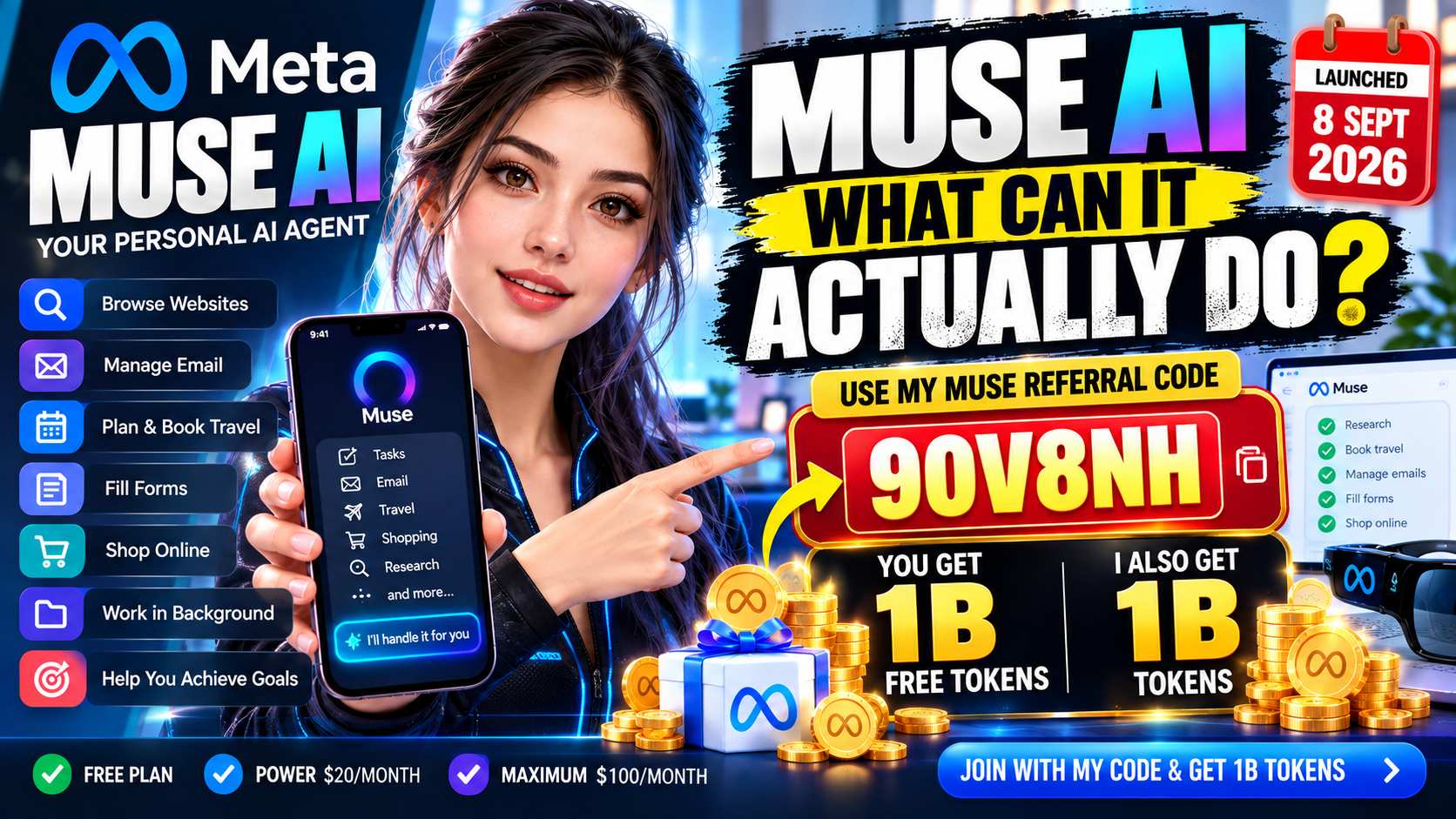
That sounds ambitious. But what does Muse actually do, how much does it cost, and how is it different from a normal AI assistant?
This guide breaks down the features, pricing, availability, privacy protections, limitations, and practical use cases you should understand before deciding whether Muse fits your needs.
Quick Overview
| Feature | Meta Muse |
|---|---|
| Product type | Personal AI agent |
| Developer | Meta |
| Launch date | September 8, 2026 |
| Free version | Yes |
| Power plan | $16/month |
| Maximum plan | $80/month |
| Platforms | Web, iOS and Android |
| Background tasks | Yes |
| Web/browser interaction | Yes |
| Connected services | Supported |
| Memory/personalization | Yes |
| Secure environment | Muse Secure VM |
| AI glasses integration | Announced |
Meta describes Muse as a personal agent that can take tasks and projects off a user’s plate rather than only providing instructions.
What Is Meta Muse?
Muse is Meta’s new personal AI agent.
The distinction between an AI assistant and an AI agent is important.
A conventional chatbot might explain how to accomplish a task. An agent is designed to take additional steps toward actually completing it.
For example, Meta says Muse can use a browser, fill out forms, help arrange travel, work with connected services and continue longer tasks even after the user closes the app.
Muse is powered by Muse Spark, Meta’s model family designed for agentic work. Earlier in 2026, Meta introduced Muse Spark as part of its broader move toward AI systems capable of planning and working with apps rather than simply generating responses.
How Does Muse Work?
Muse runs inside what Meta calls a Muse Secure VM.
A VM, or virtual machine, is essentially a separate computer environment running in the cloud.
Muse gets its own browser and computing environment so it can perform tasks on the user’s behalf.
This architecture allows Muse to interact with websites even when a dedicated integration is unavailable.
Meta says users remain in control of which services Muse can access and what level of permission it receives.
What Can Muse Actually Do?
Muse’s biggest difference from traditional AI chatbots is its ability to move from conversation to action.
Meta lists capabilities such as working with email, arranging travel, opening websites, completing forms and helping manage larger goals.
It can also keep working on certain tasks after the user leaves the app.
When Muse reaches an action that requires additional permission, it can return to the user for approval.
For example, Meta says it checks with users before sensitive actions such as sending an email or completing a purchase.
1. Browser-Based Tasks
Muse has access to a browser inside its virtual environment.
This potentially allows it to navigate websites and perform multi-step web tasks rather than merely giving you instructions.
2. Forms and Online Processes
Meta says Muse can fill out forms and perform browser-based workflows.
This could reduce repetitive manual work for users who regularly complete online processes.
3. Email Tasks
With appropriate permissions, Muse can work with email.
Importantly, the user determines whether Muse receives read-only access or broader permissions.
Sensitive actions such as actually sending an email can require confirmation.
4. Travel Planning and Booking
Travel is another example Meta uses to demonstrate the difference between an assistant and an agent.
Instead of stopping after creating an itinerary, an agent can potentially proceed through additional steps of the travel-planning process.
5. Long-Term Goals
Muse is also positioned around goals rather than isolated prompts.
A user can describe something they want to accomplish, after which Muse can help develop a plan and continue advancing the work.
This is one of the more interesting aspects of agent-based AI.
6. Background Work
Muse doesn’t necessarily stop working when its app closes.
Meta says longer tasks can continue in the background, with Muse returning when something changes or when user approval is required.
Get 1 Billion Free Muse Tokens With My Referral Code
If you’re planning to try Muse, there is currently a referral bonus that can give new eligible users 1 billion additional Muse tokens.
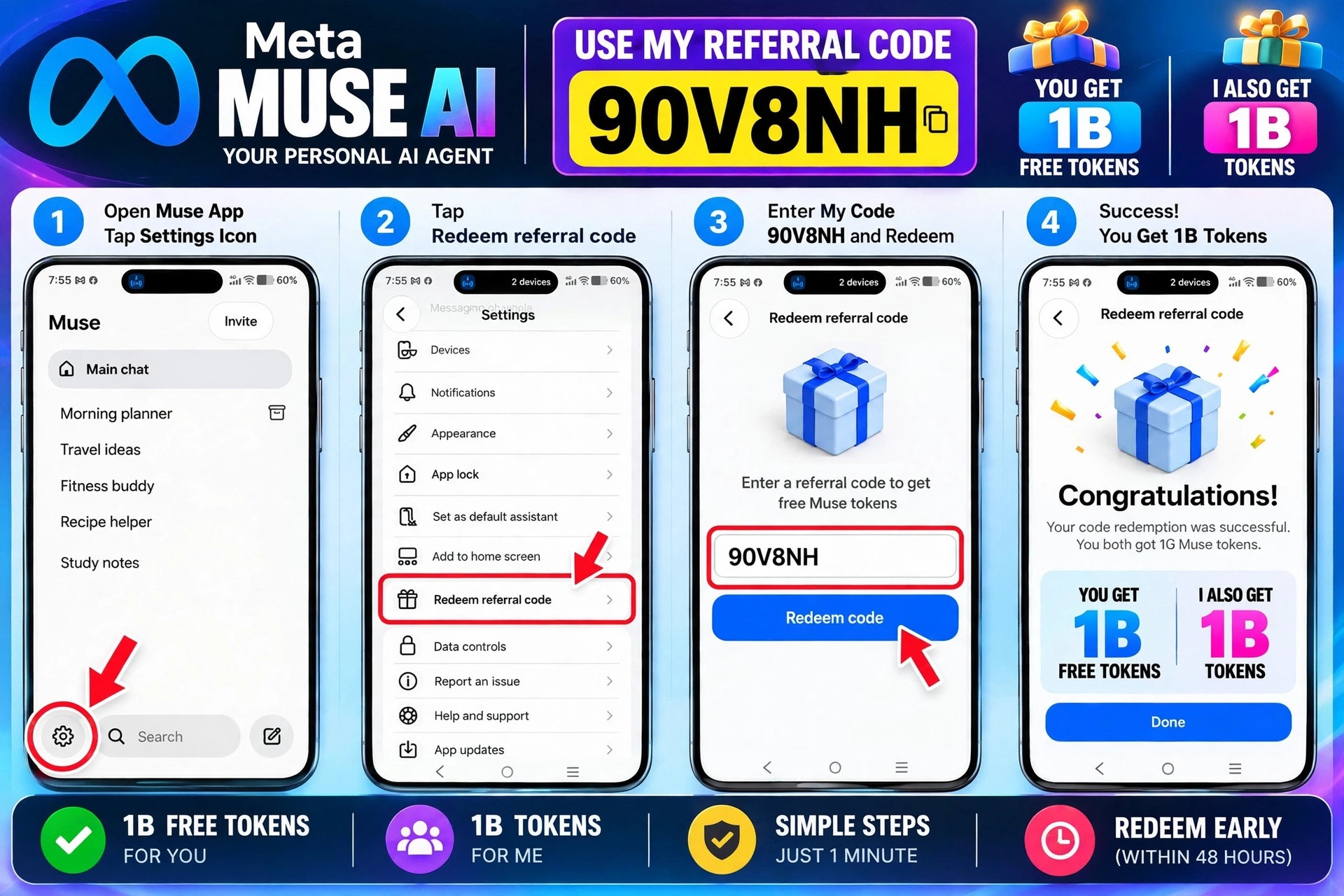
Here’s how the referral works:
- Join Muse and create your account.
- Open Settings in Muse.
- Find Redeem Referral Code.
- Enter my referral code: [90V8NH]
- Redeem it within the eligible referral period shown by Muse.
After a successful redemption, you receive 1 billion additional Muse tokens.
Referral Disclosure
For complete transparency, this is my personal Muse referral code. If you successfully redeem it, you receive 1 billion Muse tokens and I also receive 1 billion Muse tokens as the referral reward.
The bonus consists of Muse usage tokens, not cash.
At the time of writing, reports of the current Muse referral flow indicate that the code generally needs to be redeemed within 48 hours of joining. Referral availability, eligibility, token amounts and terms can change, so check the current offer displayed inside Muse before relying on the bonus.
My Muse Referral Code:
[REFERRAL CODE: 90V8NH ]
⚠️ Disclaimer: The 1B token referral reward is a limited-time offer and may change or end anytime at Meta’s discretion. Terms apply — please check the current offer on your Muse app’s invite screen before redeeming.
Muse Memory and Personalization
Muse is designed to remember information that matters to the user.
This can allow future actions and suggestions to reflect previous conversations without requiring users to repeat the same context every time.
Meta gives examples such as remembering preferences and using information previously mentioned when helping with future tasks.
This level of personalization can make an agent considerably more useful.
It also makes privacy and permission controls especially important.
Muse Secure VM Explained
Security is a major part of Meta’s pitch for Muse.
According to Meta, each Muse operates inside its own dedicated cloud environment.
The company says credentials supplied for connected services are placed into secure storage so Muse can use them without directly seeing the password itself.
Meta also describes a separate Sentinel agent that evaluates actions leaving the virtual environment.
Muse can additionally maintain an audit trail showing what it has done and what it plans to do.
These are Meta’s stated security mechanisms. Users should distinguish the company’s architectural claims from independent long-term evidence about how the system performs as adoption expands.
Does Muse Use Your Conversations for Advertising?
Meta states that Muse conversations and data stored in the Muse VM are not shared with Meta’s advertising systems.
Meta also says users can opt out of having their Muse interactions used to train its AI models.
Users can disconnect connected services or change the permissions granted to them.
Because an AI agent may have access to significantly more personal information than an ordinary chatbot, users should still review permissions carefully before connecting sensitive accounts.
Muse Pricing
Muse has a free tier as well as paid options.
Independent launch reporting identified two paid subscriptions:
| Plan | Reported Price |
|---|---|
| Free | $0 |
| Power | $16/month |
| Maximum | $80/month |
The primary difference is usage capacity.
Meta expects many ordinary users to remain on the free tier, while people handing off significantly more work to Muse can move to a paid subscription.
Muse also includes a usage meter so users can see how much of their allowance remains.
Pricing and availability can change, so users should check the current Muse interface before subscribing.
Is Muse Available Worldwide?
Not yet.
At launch, Meta announced that Muse was rolling out in the United States on iOS, Android and the web.
Broader availability is expected to evolve over time.
That means someone outside the supported launch regions may not have the same access described in U.S.-based reviews.
Muse Is Coming to Meta AI Glasses
Muse’s story has already progressed since its September 8 launch.
At Meta Connect 2026, Meta announced plans to bring Muse to its AI glasses.
The concept is particularly interesting because Muse will eventually be able to combine an agent with what the glasses can see.
Meta says users could point their attention toward something in the real world and ask Muse to take action without first manually describing everything on screen.
Meta also announced a voice mode intended to allow longer conversations while Muse continues working in the background.
This suggests Meta views Muse as more than a standalone app. It is intended to become an AI layer spanning multiple Meta devices and services.
Muse vs Meta AI: What’s the Difference?
The names can be confusing.
Meta AI is Meta’s broader AI assistant experience.
Muse Spark is part of Meta’s model family.
Muse Image is an image-generation model.
Muse Video refers to Meta’s video-generation technology.
And Muse, launched September 8, is the personal AI agent discussed in this review.
These products shouldn’t be treated as interchangeable.
This distinction is especially important when searching for “Muse AI,” because the phrase can refer to different Meta technologies as well as unrelated third-party products.
Muse AI vs Traditional Chatbots
The simplest comparison is:
Traditional chatbot:
“Here’s how you can do this.”
AI agent:
“With your permission, I’ll work through the task.”
That difference could become increasingly significant.
Generating an answer may take seconds.
Completing a real task could involve browsing multiple pages, checking information, interacting with services, waiting for changes and requesting approval.
Muse is designed around the second workflow.
Potential Advantages
Muse has several characteristics that could make personal AI agents useful.
It can take actions instead of only producing instructions, continue certain tasks in the background, work through a browser, connect with other services and retain useful context between interactions.
The dedicated VM and approval mechanisms are also notable architectural features.
Perhaps most importantly, Muse demonstrates where consumer AI appears to be heading: from answer generation toward task execution.
Important Limitations
Muse is still a very new product.
That matters.
A system capable of acting across websites introduces different risks from a chatbot that only produces text.
Browser interfaces change. Websites can behave unexpectedly. AI systems can misunderstand instructions. Connected services may contain sensitive information.
Users should therefore review what Muse plans to do before approving important actions.
Availability is another limitation because the initial rollout is U.S.-focused.
Heavy users may also eventually encounter the usage limits separating the free tier from the paid plans.
And because Muse launched only in September 2026, there isn’t yet years of independent evidence showing how reliably it handles every category of real-world task.
Who Might Find Muse Useful?
Muse may be interesting to people who repeatedly perform multi-step digital tasks and want AI to handle more of the execution.
Potential use cases include research, administrative work, travel planning, organizing projects, dealing with repetitive web processes and coordinating longer-running personal tasks.
Someone who only needs occasional questions answered may not need the agent capabilities or a paid Muse subscription.
Is Muse Just Another ChatGPT Competitor?
Not exactly.
There is overlap because both involve conversational AI, but Muse’s positioning focuses heavily on personal agency and task execution.
The more useful comparison isn’t simply which chatbot gives better answers.
The larger question is:
How effectively can an AI system move from understanding a request to safely completing the associated work?
That is the category Muse is trying to compete in.
Is Muse Free?
Yes.
Meta launched Muse with free usage and optional subscriptions for heavier users.
Users shouldn’t assume that every task will remain unlimited under the free tier, however.
The amount of work an autonomous agent performs can require considerably more computing resources than a simple chatbot response.
Is Muse Safe?
There isn’t enough long-term evidence yet to reduce this to a simple yes-or-no answer.
Meta has implemented several protections, including a dedicated Secure VM, isolated credential handling, user-controlled permissions, approval requirements for sensitive actions, a Sentinel agent and an audit trail.
Those are meaningful design features.
At the same time, an AI agent capable of interacting with email, websites, accounts and transactions naturally deserves more careful permission management than a basic chatbot.
Users should start with limited permissions and review sensitive actions before approving them.
Final Takeaway
Muse represents an important shift in consumer AI.
The important feature isn’t simply that Muse can generate better answers.
It’s that Meta is attempting to build an AI system capable of doing work across the internet on a person’s behalf.
Muse can use its own browser environment, work with connected services, continue longer tasks in the background, remember useful context and return for approval before certain sensitive actions.
The free tier makes it relatively accessible where the service is available, while the reported $16 Power and $80 Maximum subscriptions target heavier usage.
But Muse is still new.
Its September 8, 2026 launch means reliability, real-world security performance, ecosystem support and the usefulness of its paid tiers will become clearer as more people use it.
For now, the most interesting reason to watch Muse isn’t that it’s another AI chatbot.
It’s that it offers an early look at a future in which AI doesn’t simply tell people what to do — it can increasingly help carry out the digital work required to get it done.
Frequently Asked Questions
When was Meta Muse launched?
Meta officially introduced Muse on September 8, 2026.
What is Muse AI?
Muse is Meta’s personal AI agent designed to perform tasks, work through websites and connected services, and help users pursue longer-term goals.
Is Muse AI free?
Yes. Muse has a free tier, with paid subscriptions available for higher usage.
How much does Muse cost?
Launch reporting lists Power at $16 per month and Maximum at $80 per month, in addition to the free tier.
Can Muse browse websites?
Yes. Muse operates with a browser inside its dedicated Muse Secure VM.
Can Muse work when the app is closed?
Meta says certain longer-running tasks can continue after users leave the application.
Does Muse require approval before taking important actions?
Meta says Muse checks with users before sensitive actions such as sending emails or completing purchases.
Is Muse the same as Muse Image or Muse Video?
No. Muse is Meta’s personal AI agent. Muse Image and Muse Video are separate generative-media technologies within Meta’s broader Muse ecosystem.
Can I use Muse outside the United States?
Muse’s initial September 2026 rollout is U.S.-focused. Availability should be checked directly because regional support can change.
Will Muse work with Meta AI glasses?
Meta announced at Connect 2026 that Muse is coming to its AI glasses in the coming months.
Best AI Tools For Beginners (2026 Guide) – Start Smart Without Technical Skills
Disclosure:
Product features, pricing and availability can change. Readers should verify current information through the official Muse and Meta pages before purchasing a subscription.
Referral Disclosure
This article contains my personal Muse referral code: 90V8NH
If you are eligible for the current Muse referral offer and successfully
redeem my code, you may receive 1 billion (1B) Muse tokens. I also receive
1 billion (1B) Muse tokens as a referral reward.
This referral benefit does not change the price you pay. Review And Decide
does not receive cash from you for using the code.
Referral eligibility, token amounts, redemption periods, availability and
other terms may change. Please verify the current offer and terms inside
Muse before redeeming the code.
Muse Referral Code: 90V8NH
Advertising Disclosure
Review And Decide may display advertisements provided by Google AdSense
and/or other third-party advertising networks.
Third-party vendors, including Google, may use cookies, web beacons,
IP addresses or similar technologies to serve, measure and personalize
advertising in accordance with their own policies and applicable law.
Advertising helps support the operation of Review And Decide. Unless
specifically stated otherwise, the presence of an advertisement does not
mean that Review And Decide independently endorses the advertiser,
product or service.
Advertising relationships do not determine our editorial conclusions.
Disclaimer
The information published on Review And Decide is provided for general
informational and educational purposes.
We make reasonable efforts to research and update our content, but we do
not guarantee that every price, feature, promotion, offer, specification,
availability or other piece of information will remain accurate or current.
AI tools, software products and online services can change frequently.
Always verify important information directly with the relevant provider
before purchasing, subscribing, registering or making a decision.
Some articles may contain referral or affiliate links/codes. When a reader
uses one of these links or codes, Review And Decide may receive a
commission, credit, tokens or another benefit. When such a relationship
exists, we aim to disclose it clearly.
Product and company names, logos and trademarks belong to their respective
owners. Their appearance on Review And Decide does not necessarily imply
sponsorship, endorsement or affiliation.
Review And Decide is an independent informational website unless an
article explicitly states otherwise.
Google ke relevant official references:
Google AdSense Privacy Disclosure Requirements
Google AdSense Required Content & Advertising Cookies
Referral/affiliate disclosure ke liye:
FTC Endorsement and Affiliate Disclosure Guidance
Privacy Policy | Disclaimer | Affiliate/Referral Disclosure | Terms & Conditions | Contact Us