The short answer
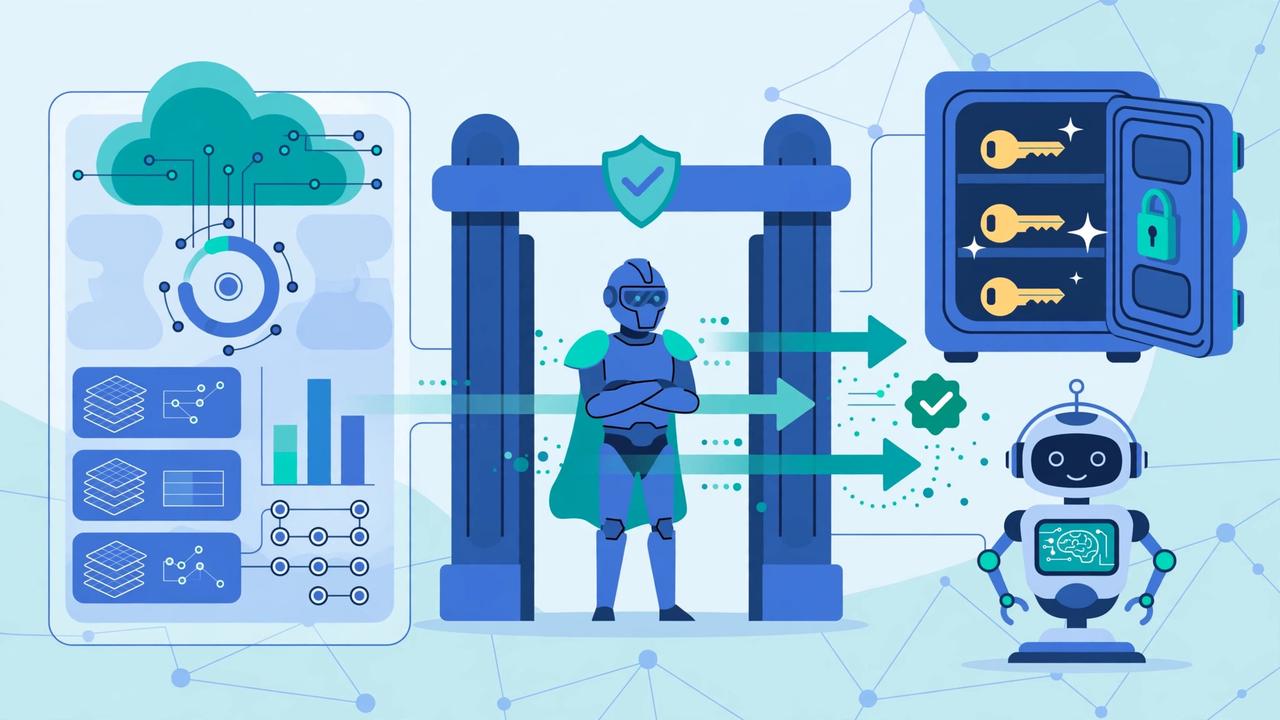
The Muse Secure VM is the dedicated cloud computer Meta built for each person who uses Muse, its personal AI agent launched on September 8, 2026. An agent that can read your email, use your logins and spend your money cannot safely run like an ordinary chatbot — so Muse lives on its own virtual machine, an isolated computer in Meta’s cloud that houses both the agent and your data, contained so no one else’s agent can reach it.
Around that machine sit four more protections: a gatekeeper called Sentinel that must approve anything Muse sends to the internet, a credential store Muse can use but never see, approval prompts before sensitive actions, and a complete audit trail. A fifth, stronger layer — Muse Confidential VM, encrypting the whole machine with a key only you hold — is still a future option.
This guide explains each layer, what it protects against, and what it does not. For the wider privacy picture, read our Muse AI privacy guide.
Why an AI agent needs its own computer at all
A chatbot answers questions. An agent like Muse acts: it opens a browser, fills in forms, reads connected accounts, sends email with your permission and checks out with a payment method. That creates three risks a chatbot never has. The agent needs your credentials, so they have to live somewhere. It reads untrusted content — web pages, emails, documents — that may try to trick it (prompt injection). And it can send data out, so a tricked agent could send the wrong thing to the wrong place.
Meta’s answer is architectural: instead of only telling the model to behave, it separated the dangerous combinations by design — an isolated computer, credentials outside the agent’s reach, and a separate checker for everything leaving the machine.
Layer 1: Isolation — one person, one machine
Every Muse user gets a dedicated virtual machine. In Meta’s words, Muse “runs on its own dedicated computer in the cloud, contained so no one else’s agent can reach it. That is where Muse lives and where the data and credentials for any service a person connects are securely stored.” The Muse Privacy Policy (effective September 17, 2026) agrees: the VM “is the core environment where Muse keeps information you share and things you create together.”
What lives inside? Your conversations, files, saved preferences, goals, memories, scheduled tasks, and connected-service credentials. Because the machine is persistent — it does not vanish when you close the app — Muse can keep working in the background and return when it needs approval.
Isolation protects you from other users: another person’s agent has no path into your machine. Note what it does not say — it separates you from other customers, not from Meta itself.
Layer 2: Sentinel — the gatekeeper Muse cannot override
Isolation alone leaves a problem: Muse still needs the internet. Meta’s solution is Sentinel, a second, separate agent. In Meta’s words, it “runs on that same machine, kept apart from Muse at the system level. Nothing Muse does reaches the internet unless the Sentinel approves it, and it asks the person for permission when needed.”
Three details make Sentinel more than a pop-up dialog:
- Separation at the system level. Sentinel is not a setting inside Muse or an instruction in its prompt, so Muse cannot decide to ignore it.
- Approval covers data leaving, not just actions — exactly the moment a prompt-injection trick would try to extract your data.
- You are the fallback judge. Actions not covered by your permissions come to you, and Muse checks before sensitive steps such as sending email or making a purchase, with a full audit trail.
In plain terms: Muse proposes, Sentinel disposes.
Layer 3: Credentials Muse can use but never see
The cleverest part of the design is how it handles passwords. Meta states: “Muse has no visibility into people’s passwords or payment methods. Any credentials a person shares with Muse go into secure storage, so Muse can use them without seeing them. Muse also cannot see passwords a person types into the browser themselves.”
Meta’s engineering explanation, as widely reported from its launch-day safety write-up, adds the mechanism: the agent handles placeholder (surrogate) tokens, and the real credential is only swapped in at the network boundary, after the action is approved. Connector code likewise runs outside the agent’s own sandbox, each connector limited to the credentials it may request.
That changes what an attacker can steal: if a malicious page tricks Muse into “revealing” a password, the agent holds only placeholders, useless outside the approved flow. At checkout, Link by Stripe likewise generates a one-time-use card, hiding your real card details.
One habit still matters: a reused password can still be guessed or leaked from another service. Before connecting accounts to any agent, run your key passwords through our free Password Strength Checker and upgrade the weak ones — the VM protects credentials in Muse’s hands, not in everyone else’s.
Layer 4: Your controls inside the VM
The fourth layer is the control Meta gives you over what enters and leaves your VM:
- Nothing connects by default. You choose each app or service (Connectors) yourself, one at a time.
- You set the access level per app. For email, you choose whether Muse can only read your mail or can also send on your behalf; many Connectors can be retrieve-only.
- You set when approval is required. By default Muse will not take many important actions, such as sending an email, without your approval — and you can change those rules in Settings.
- You can disconnect at any time, stopping all data exchange with that service from then on.
- You get an audit trail — a complete record of what Muse has done and plans to do.
See our full Meta Muse AI review 2026 for what Muse does with these connections.
Layer 5: The data rules written into the policy
The VM’s walls are matched by data rules in the Muse Privacy Policy:
- No advertising use. “Muse doesn’t share your conversations or the data in your virtual machine with Meta ad systems” — and the policy says this applies even if your Muse account sits in the same Accounts Center as your other Meta products.
- A separate account is a cleaner boundary. Kept separate, the policy says Muse won’t share your interactions or VM data with other Meta Products. Inside one Accounts Center, Meta may combine other information across profiles, except where the policy says data will not be used.
- Training is your choice — but on by default. The setting that lets Meta use your interactions to train its models is on when you first use Muse. Switching it off in Settings, under “Data controls,” stops that use, and the change applies to previous interactions too.
- Forgetting and deleting exist, with a caveat. You can delete messages, Side Chats and files, tell Muse to forget specific topics, and Reset Muse to delete all your data. The policy is candid, however, that after deletion Muse may still “remember” information it learned.
What the Secure VM does NOT protect against
An honest review has to draw the other side of the line. The Secure VM is a strong design against other users, outside attackers and a tricked agent. It is not a guarantee against everything:
- Meta itself. Meta operates the VM, and its executives have acknowledged in launch interviews that, while policy does not allow looking inside users’ VMs, it remains technically possible today. Until Confidential VM arrives, the boundary is policy, not encryption.
- Prompt injection, completely. Meta’s safety documentation acknowledges prompt injection remains an open industry problem, and that Muse will sometimes make mistakes. The design limits damage when the model is fooled; it does not eliminate attempts.
- Your own connection choices. Every Connector widens what Muse can reach. Read-and-send access granted on day one is still read-and-send access.
- Data already learned. Disconnecting or deleting does not rewind what Muse learned; Forget and Reset Muse are the tools for that.
None of this makes the Secure VM fluff — it makes it a system with a defined perimeter. Knowing the perimeter lets you use it well.
Secure VM vs Confidential VM: what changes later
Meta has promised a stronger mode, Muse Confidential VM, “later this year” (2026): the whole VM — including your data and conversations — encrypted with a key only you hold, so not even Meta can access it.
Status check, October 26, 2026: it has not launched yet. The Muse Privacy Policy still describes it in the future tense — “In the future, Muse users will also have the choice to use a Muse Confidential VM” — and trade reporting (TestingCatalog, October 20, 2026) has only found it in partially implemented form in the web interface.
Until it arrives, the summary is: Secure VM = isolated from everyone except Meta, governed by policy. Confidential VM = inaccessible even to Meta, enforced by encryption.
How to get the most protection from your Secure VM
- Turn off training first. Settings → Data controls → switch off model-training use of your interactions; it applies to previous interactions too.
- Start read-only. Connect one service at a time, retrieve-only where offered, and widen access only after Muse handles the narrow version well.
- Keep approvals strict for money and messages — sending email, purchases and sharing information should stay behind your explicit approval.
- Read the audit trail weekly at first — the fastest way to learn what your agent actually does.
- Use strong, unique passwords on connected accounts (the checker linked above helps).
- Review and prune. Disconnect unused Connectors, ask Muse what it remembers, and use Forget or Reset Muse for a clean slate.
The Secure VM is included on every plan, including the free tier — see our Muse AI free plan guide.
Honest verdict
The Muse Secure VM is a serious attempt to give a consumer AI agent a properly engineered home: one isolated machine per person, a gatekeeper it cannot override, credentials it can use but never see, per-app permissions and a full audit trail. Against the realistic threats, the design answers with structure, not slogans.
Its limit is clear too: today the wall between your VM and Meta is a policy promise, not a cryptographic lock, and prompt injection remains unsolved. Confidential VM is the promised fix for the first of those — still on the way.
Our verdict: the Secure VM makes Muse reasonable to trust with everyday tasks provided you configure it — training off, read-only first, approvals on. Accept the defaults blindly, and you are trusting more than the technology requires.
Frequently Asked Questions
What is the Muse Secure VM in simple terms?
A dedicated virtual computer in Meta’s cloud that belongs to you alone. Your agent, conversations, files and connected-service credentials all live inside it, contained so no one else’s agent can reach it — including while tasks continue after you close the app.
How is it different from a normal chatbot?
A chatbot runs in a shared app and only answers questions. Muse acts — browsing, using accounts and paying — so Meta gave it an isolated machine, a Sentinel gatekeeper approving anything sent to the internet, and a credential store the agent cannot read.
What is Sentinel in Muse?
A separate agent on the same machine, kept apart from Muse at the system level. Nothing Muse does reaches the internet unless Sentinel approves it; when an action is not covered by your permissions, it asks you — which is why Muse checks before sending an email or making a purchase.
Can Muse see my passwords or card numbers?
No, according to Meta. Credentials go into secure storage inside your VM, so Muse can use them without seeing them, and it cannot see passwords you type into the browser. At checkout, Link by Stripe generates a one-time-use card, hiding your real card details from the merchant and from Muse.
Can Meta itself see inside my Muse Secure VM?
Today the protection against Meta is policy, not encryption: Meta runs the VM, its policies restrict access, and executives have acknowledged access remains technically possible. Confidential VM is designed to change that — but it has not launched yet as of October 2026.
What is Muse Confidential VM and when is it coming?
Meta’s planned stronger mode: your entire VM, including data and conversations, encrypted with a key only you hold, so not even Meta can access it. Meta said it would arrive later in 2026. As of October 26, 2026, the Privacy Policy still calls it a future choice — it is not generally available yet.
Does the Secure VM stop prompt injection attacks?
Not completely — Meta does not claim otherwise; its safety documentation calls prompt injection an open industry problem. The VM limits the damage: the agent holds no real credentials to leak, Sentinel must approve data leaving, and sensitive actions need your approval.
How can I make my Muse VM as safe as possible?
Turn off training use in Settings → Data controls, connect services one at a time starting read-only, keep approvals on for messages and purchases, review the audit trail, use strong unique passwords, and disconnect unused services. Forget and Reset Muse handle clean-ups.
References
- Muse Privacy Policy — Meta (muse.ai) — effective September 17, 2026; VM isolation and Confidential VM wording.
- Introducing Muse — Meta Newsroom — official launch announcement, September 8, 2026.
- Muse — official homepage
Related reading on ReviewAndDecide
- Full Meta Muse AI Review 2026 — what Muse is and what it can do, in depth.
- Muse AI Privacy 2026: Is Your Data Safe? — training defaults, deletion limits and key controls.
- Muse AI Free Plan 2026 — limits, tokens and what you get at $0.
Try Muse AI With My Referral Code — Signing up for Muse? Use my referral code 90V8NH — under the currently reported offer, eligible new users may receive bonus tokens, and I may receive tokens as well. This is not guaranteed: the offer can change or end at any time, and using the code costs you nothing extra. Full details and redemption steps: Muse AI Referral Code 2026.
Honest review disclaimer: This article reflects information available as of October 2026, including Meta’s Muse Privacy Policy (effective September 17, 2026) and Meta’s launch announcement of September 8, 2026. AI product features, security designs, privacy policies, plan limits, availability, and referral terms can change at any time — always verify the current details on Meta’s official site or inside the Muse app before deciding. Referral disclosure: Links to Muse in this article may include my personal referral code 90V8NH. Under the currently reported offer, using the code when you sign up may grant you bonus tokens, and I may receive tokens as well — this is not guaranteed and the offer can change or end at any time. Using the code costs you nothing extra.