The short answer
Muse AI background tasks that run automatically are the core of what Meta’s Muse actually is. Muse is not a chatbot that stops the moment you close the conversation. It is a personal AI agent that lives on its own dedicated cloud computer — the Muse Secure VM — so a task you give it keeps moving while your phone is locked, while you are in a meeting, and while you sleep. Meta’s own launch wording is precise: “For tasks that take more time, Muse keeps working after people close the app, and comes back when something changes or when it needs approval, like before it sends an email or makes a purchase.”
That split is the whole story. Research, comparing, planning, filling in forms, watching for changes and preparing the next step can all happen without you. Sending, spending and other sensitive steps cannot — those wait for your yes. This guide explains which Muse AI background tasks that run automatically are real today, how a background task actually flows from goal to result, what still needs approval, and where the honest limits are. For the full picture of the product itself, start with our full Meta Muse AI review 2026.
What "background tasks" actually means in Muse
Most AI assistants are foreground tools. You ask, they answer, and nothing exists between your messages. Muse was designed the other way round. You state a goal in the Muse app, on the web at muse.ai, or in a WhatsApp chat, and Muse helps you build a personalised plan, coordinates your time and resources, and then — in Meta’s words — “advances the work on its own.” It can open a browser, fill out forms and negotiate on your behalf.
Three pieces of architecture make that possible. First, the agent does not live on your phone: it lives in the Muse Secure VM, a dedicated cloud computer with its own browser, storage and compute, contained so no one else’s agent can reach it. Second, a separate Sentinel agent runs on that same machine, and nothing Muse does reaches the internet unless the Sentinel approves it. Third, Muse remembers what matters to you, so a task can use details you mentioned once — a dietary restriction, a saved recipe reel, a budget — without re-briefing. Our Muse Secure VM explainer goes deeper on that security design.
How a background task flows, step by step
Understanding the flow matters more than any feature list, because it tells you exactly where you stay in control.
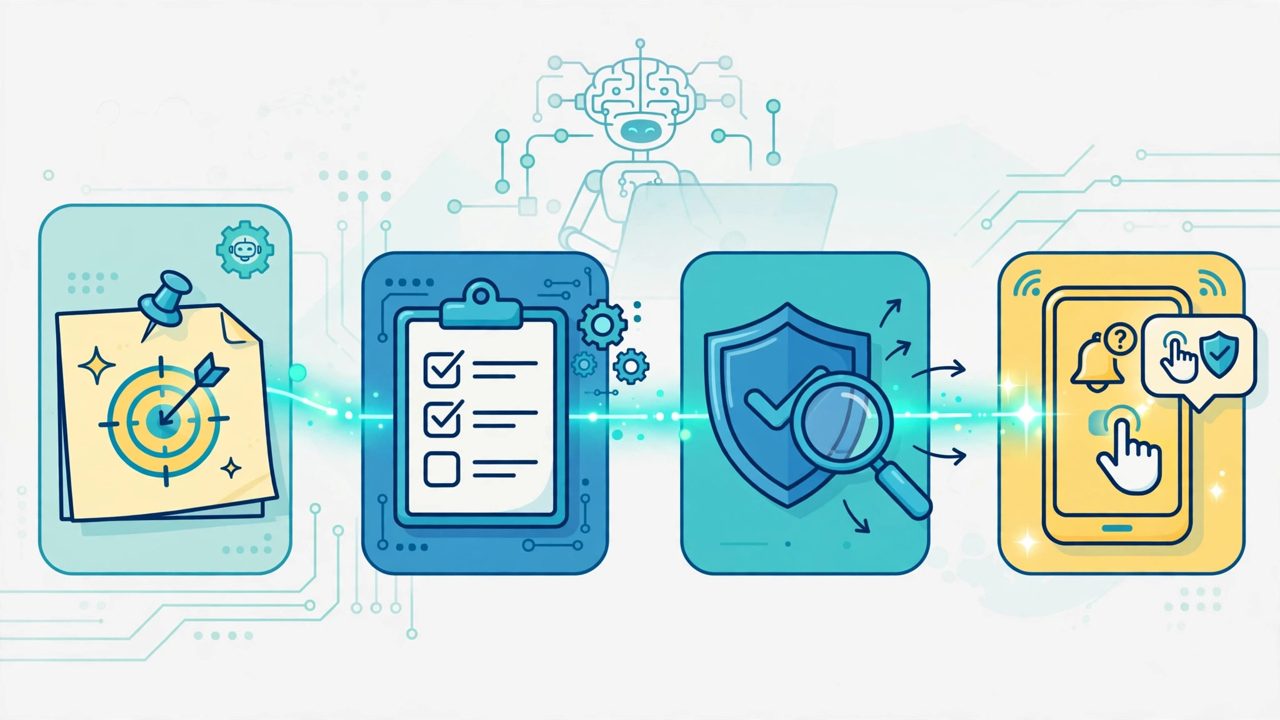
- You set the goal. One message is enough — sell my car for a good price, plan this trip, lower this bill, keep an eye on this product’s price. Vague goals get a clarifying plan back; specific goals start faster.
- Muse builds a plan. It breaks the goal into steps, coordinates time and resources, and shows you a complete audit trail of everything it has done and plans to do.
- The work advances on its own. Research, browsing, comparing options, drafting, filling forms and checking for changes happen in the background on the Secure VM — after you close the app.
- Sentinel checks what leaves the machine. Outbound actions pass the separate safety check before they reach the internet.
- You approve the sensitive steps. Before Muse sends an email or makes a purchase, it comes back to you. At checkout it can pay with a one-time-use card number through Link by Stripe, so your real card number stays hidden.
- Muse reports back when something changes. A price moved, a reply arrived, a better option appeared — that is when you hear from it, not at every micro-step.
What Muse can do automatically: real examples
Meta’s launch announcement gives concrete examples, and they cluster into five kinds of background work.
Research and comparison that takes time. Comparing flights, hotels or products is slow, tab-heavy work. As a background task, Muse can work through options over time and return with a shortlist. Preparing research of your own? Our free Keyword Idea Finder shows what people actually search for before you hand the deeper comparison to an agent.
Monitoring and watching for change. Because the agent persists, it can watch things that change slowly: a price you want to drop, a booking that might open up. Meta frames this as Muse coming back “when something changes” — the notification is the product, not the checking.
Negotiation and legwork. Meta specifically names getting better results with less effort: “selling a car for more, lowering a bill, adjusting a training plan as the rest of someone’s life shifts.” These are multi-step, back-and-forth jobs — exactly the kind that die in a normal chat window and survive as background tasks.
Everyday preparation from things you saved. Muse can turn a recipe reel you saved on Instagram into a grocery list, suggest a dinner-party menu, and remember your friends’ dietary restrictions before the invites. The background part is the assembly — while the sending still waits for you.
Proactive suggestions. Because Muse remembers what matters to you, Meta says it can make suggestions unprompted and act on details mentioned only once. Used well, this is a background task you did not have to remember to set. Used carelessly, it is also why the controls in the next sections matter.
At Connect in September 2026, Meta also showed where this is heading: Muse checking back in when background work is done, computer work on a Mac where — as Meta’s chief AI officer put it — “you can walk away from your computer and it keeps working,” and Muse getting its own email address. Meta described those as coming features, so treat them as direction, not current fact.
What Muse cannot do without you
The approval gates are not fine print — they are the design. Muse checks with you before sensitive actions like sending an email or making a purchase. You choose which apps Muse connects to and exactly how much access each one gets: for email, for example, you choose whether Muse only reads your mail or can also send on your behalf. You can change access or disconnect a service whenever you want, and you can tell Muse to “forget” specific things it has learned.
Background also does not mean unlimited or infallible. Muse is new, agents can make mistakes, and some websites block AI agents outright — a limit our Muse AI vs ChatGPT comparison covers. Background work still consumes your weekly token allowance, and availability is still rolling out country by country.
How to give Muse a background task that actually works
The people who get value from background tasks brief them like a good manager, not like a search box.
- State the outcome, the boundary and the deadline. “Find three flights under this budget, window seats only, and come back before Friday” beats “look at flights.”
- Say what must never happen without you. Sending, spending, sharing and deleting should be named as approval-only, even though Muse gates them by default.
- Connect only the services the task needs. Access is per-service and revocable — use that. Start narrow, widen when trust is earned.
- Prepare clean inputs. A rambling voice note becomes a far better task once it is text. Our free Free MP3 to Text Converter turns a recording into a transcript you can paste as the brief.
- Review the audit trail. Muse shows everything it has done and plans to do. Skimming it is the cheapest quality control there is.
Pricing: what background work costs
Background tasks draw on the same allowance as everything else. Muse is free to start, with up to 100 million tokens a week. Power costs $20 a month for 500 million a week, and Maximum costs $100 a month for up to 3 billion a week. A payment card is required to sign up, even free, according to launch reporting. Longer, always-on goals use more allowance than one-off questions — heavy background users are who the paid tiers are for. Our Muse AI pricing guide breaks the plans down. Prices checked November 2026; verify before subscribing.
Privacy and safety while Muse works unattended
Unattended work raises the privacy stakes. Your agent runs on its own dedicated cloud computer. Credentials go into secure storage, so Muse can use them without seeing them — it also cannot see passwords you type into the browser yourself. The Sentinel check gates what reaches the internet. Muse does not share your conversations or VM data with Meta’s ad systems, and you can opt out of model training. A Muse Confidential VM, encrypted with a key only you hold, is planned for later this year. Those are Meta’s stated designs, not an independent audit; our Muse AI privacy guide weighs them in full.
Pros and cons at a glance
Pros: tasks genuinely continue after you close the app; one goal becomes a plan that advances on its own; approval before sending or spending; a visible audit trail; memory means less re-briefing; one-time card numbers hide your real card at checkout. Cons: very new, with availability still rolling out; mistakes are possible and some sites block agents; background work consumes your weekly token allowance; the strongest always-on uses push you toward paid tiers; several headline background features shown at Connect were announced as coming, not yet live.
Honest verdict
Muse AI background tasks that run automatically are not a gimmick — they are the product. Muse really does keep working after you close the app, advancing research, preparation, monitoring and negotiation on its own cloud computer; and it really does stop and ask before it sends or spends. If your week is full of slow, multi-step errands that die in open browser tabs, that combination is genuinely useful, and the free tier is enough to test it on one real goal. If you mainly need answers, writing or code in the moment, a foreground assistant will feel faster. Give Muse one bounded, real background task — clear outcome, clear limits — and judge it by the audit trail it brings back.
Frequently Asked Questions
What are Muse AI background tasks?
They are tasks Muse keeps working on after you close the app. Muse lives on its own dedicated cloud computer, the Muse Secure VM, so it can advance a goal on its own — researching, comparing, filling in forms, watching for changes — and come back to you when something changes or when it needs your approval.
Does Muse keep working when my phone is off or the app is closed?
Yes, that is the design. Because the agent runs in the cloud rather than on your phone, closing the app does not end the task. Meta says Muse keeps working on longer tasks after people close the app and returns when something changes or approval is needed.
What can Muse do automatically without asking me first?
Research, browsing, comparing options, building plans, drafting, filling in forms, preparing lists from things you saved, and monitoring for changes can proceed automatically. Muse can also make proactive suggestions based on what it remembers about you.
What does Muse still need my approval for?
Sensitive actions. Meta states that Muse checks with you before sending an email or making a purchase, and the separate Sentinel check must approve anything that reaches the internet. You also control which services Muse connects to and how much access each connection gets.
Can Muse negotiate or lower a bill in the background?
Meta gives this as an example of what Muse is built for — lowering a bill, selling a car for more, and adjusting a training plan as your life changes. The legwork and negotiation happen as background work, while any final sending or payment step still follows the approval rules.
Do background tasks use up my Muse allowance?
Yes. Background work runs on the same weekly token allowance as the rest of Muse: up to 100 million tokens a week free, 500 million on Power at $20 a month, and up to 3 billion on Maximum at $100 a month. Longer, always-on goals will use more of that allowance than single questions.
Is it safe to let Muse work unattended?
Meta’s stated safeguards are a dedicated Secure VM per user, credentials stored so the agent can use them without seeing them, a separate Sentinel approval check, a full audit trail, and the ability to disconnect services or tell Muse to forget things at any time. Muse is still new and can make mistakes, so start with bounded tasks and review the audit trail.
References
- Introducing Muse — Meta Newsroom — Meta’s official launch announcement, September 8, 2026, including the background-work and approval wording quoted in this article.
- Everything new coming to Meta’s AI agent Muse — TechCrunch — Connect 2026 coverage of announced background features, including Mac computer work and Muse’s own email address.
- Introducing Muse Spark — Meta AI Blog — Meta on the model family behind Muse and its agentic capabilities.
Related reading on ReviewAndDecide
- Full Meta Muse AI Review 2026 — the pillar review of what Muse is, what it costs and how it works.
- Muse Secure VM Explained 2026 — the cloud computer that makes background tasks possible, and how Sentinel checks its work.
- How to Use Muse AI: A Beginner’s Step-by-Step Guide — set up Muse and give it your first task.
Try Muse AI With My Referral Code — Signing up for Muse? Use my referral code 90V8NH — under the currently reported offer, eligible new users may receive bonus tokens, and I may receive tokens as well. This is not guaranteed: the offer can change or end at any time, and using the code costs you nothing extra. Full details: Muse AI Referral Code 2026.
Honest review disclaimer: This article reflects information available as of November 2026, including Meta’s launch announcement of September 8, 2026 and its Connect 2026 announcements, some of which describe features as coming rather than live. AI product features, prices, limits, regional availability and referral terms can change at any time — always verify the current details on Meta’s official pages before deciding. Referral disclosure: Links to Muse in this article may include my personal referral code 90V8NH. Under the currently reported offer, using the code when you sign up may grant you bonus tokens, and I may receive tokens as well — this is not guaranteed and the offer can change or end at any time. Using the code costs you nothing extra.